

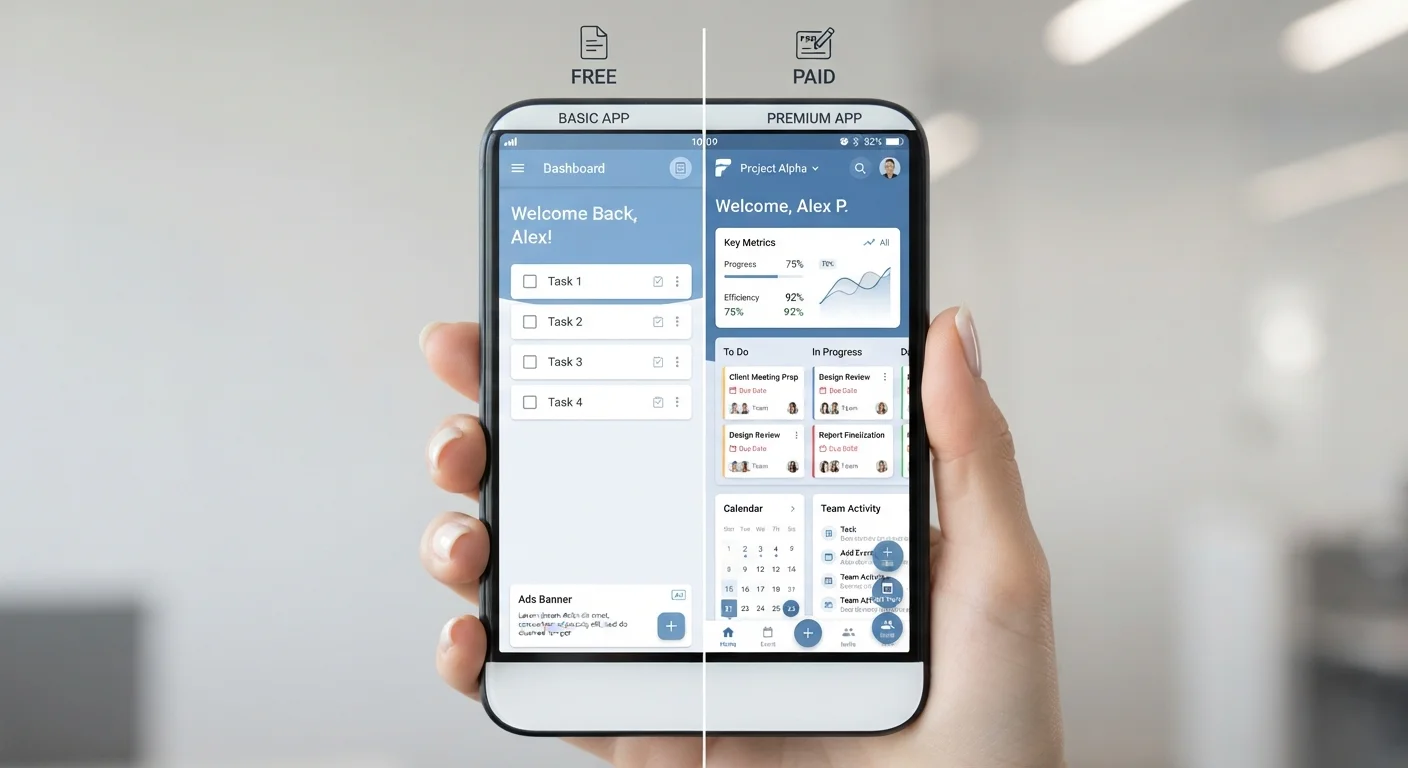
Key Takeaways
- Free app tiers typically restrict storage, remove ad-free access, or limit core features.
- Paying for an app upgrade is worth it when free-tier limits actively block your regular use.
- Many freemium apps grant full access during a trial period, so you can test before committing.
- Some paid features, like offline access or advanced export, matter only for specific use cases.
- Checking your active subscriptions periodically helps avoid paying for upgrades you rarely use.
Free tier lets you test before committing
You can use the core app at no cost and get a realistic sense of how it fits your routine before deciding whether a paid upgrade adds enough value.
Paid tier typically removes ads
Eliminating ads can noticeably speed up the experience in apps where ads load between actions, which matters most in apps you open many times a day.
Paid tier often adds offline access
Being able to use an app without an internet connection, whether on a plane or in a low-signal area, is a concrete functional gain for frequent travelers or commuters.
Storage and usage caps expand significantly
Paid tiers usually multiply the available storage or raise usage limits enough that most users will not hit them, removing a recurring friction point.
Free tier costs nothing for occasional use
If you open an app only a few times a month and the free tier covers those sessions, there is no functional reason to pay.
Paid tiers add up across multiple apps
A few dollars per month per app reaches a meaningful annual total quickly, especially when several apps in your routine each have a separate subscription.
Free tiers may include data-funded advertising
Some apps support their free tier through targeted advertising, which involves collecting usage data. The extent of this varies by app and is detailed in the app's privacy policy.
Paid features may not match your actual use
Advanced export options, collaboration tools, or automation features sound appealing but may not be things you reach for in ordinary use, making the upgrade fee hard to justify.
Auto-renewal charges continue after you stop using an app
Subscriptions renew automatically until canceled, so an app you stop using regularly keeps billing until you actively turn it off.
Trial periods are short and easy to miss
A seven-day trial may expire before you have had a chance to thoroughly test the paid features, leading to an accidental charge if you forgot to cancel.
Our Verdict
Free app tiers work well for casual or occasional use, but when limits disrupt your routine or cost you time, upgrading often makes practical sense. The decision comes down to how frequently you use the app and whether the restricted features are ones you actually reach for.
Upgrading to a paid tier is a reasonable choice for anyone who uses an app daily and finds themselves routinely bumping into its free-tier restrictions.
How freemium apps are designed
Most popular apps today follow a freemium model: the app is free to download, and a baseline set of features is available at no cost. A paid tier, usually billed monthly or annually, unlocks additional capabilities. The free tier is not broken; it is intentionally limited so that users who need more have a reason to pay.
App makers use several common levers to create that separation. Storage caps are one of the most frequent. A note-taking or cloud storage app might offer a few gigabytes free, then charge for more. Ads are another: free users see them, paid users do not. Feature gating is the third pattern: the core tool is free, but advanced functions like automation, priority support, collaboration tools, or offline access sit behind the paywall.
Understanding which lever a specific app is using tells you a lot about whether the free version will serve you. If the main restriction is ads and you find them tolerable, the free tier may be genuinely usable. If the restriction is a hard storage or usage cap you will hit within weeks, the free tier is more of a trial than a permanent option.
What you actually give up on the free tier
Free tier lets you test before committing
You can use the core app at no cost and get a realistic sense of how it fits your routine before deciding whether a paid upgrade adds enough value.
Paid tier typically removes ads
Eliminating ads can noticeably speed up the experience in apps where ads load between actions, which matters most in apps you open many times a day.
Paid tier often adds offline access
Being able to use an app without an internet connection, whether on a plane or in a low-signal area, is a concrete functional gain for frequent travelers or commuters.
Storage and usage caps expand significantly
Paid tiers usually multiply the available storage or raise usage limits enough that most users will not hit them, removing a recurring friction point.
Free tier costs nothing for occasional use
If you open an app only a few times a month and the free tier covers those sessions, there is no functional reason to pay.
Paid tiers add up across multiple apps
A few dollars per month per app reaches a meaningful annual total quickly, especially when several apps in your routine each have a separate subscription.
Free tiers may include data-funded advertising
Some apps support their free tier through targeted advertising, which involves collecting usage data. The extent of this varies by app and is detailed in the app's privacy policy.
Paid features may not match your actual use
Advanced export options, collaboration tools, or automation features sound appealing but may not be things you reach for in ordinary use, making the upgrade fee hard to justify.
Auto-renewal charges continue after you stop using an app
Subscriptions renew automatically until canceled, so an app you stop using regularly keeps billing until you actively turn it off.
Trial periods are short and easy to miss
A seven-day trial may expire before you have had a chance to thoroughly test the paid features, leading to an accidental charge if you forgot to cancel.
The tradeoffs vary by app category. In productivity apps like document editors or task managers, free tiers often cap the number of projects, documents, or collaborators. In music or podcast apps, free tiers typically include ads and may prevent downloading for offline listening. In photo editing or design tools, export quality or the number of templates is often restricted.
One area that tends to surprise users is data and privacy. Some apps fund their free tier partly through data collection and targeted advertising. Moving to a paid tier can sometimes reduce that data use, though this varies by app and is worth reading the privacy policy to confirm. App permissions are a related concern: what an app can access on your phone does not always change between tiers, but it is worth understanding what you agreed to when you first tapped Allow.
When upgrading is and is not worth it
The clearest case for upgrading is when a free-tier limit interrupts something you do regularly. If you hit a storage cap every month and spend time deleting files to stay under it, the paid tier is solving a real problem. If ads load slowly and disrupt your workflow in an app you use for work, the time cost may outweigh the subscription fee.
The case against upgrading is equally straightforward. If you open the app a few times a month and the free tier covers those sessions, paying monthly adds up over a year without much return. Forgotten subscriptions accumulate this way: a one-time upgrade that felt worthwhile during a busy period keeps billing long after your usage drops off.
Before upgrading, most apps offer a free trial of the paid tier, typically seven to fourteen days. Use it actively, focusing on the specific features you think you need, rather than casually browsing. That trial period is the most reliable way to find out whether the paid features change how you use the app.
Canceling during a trial period
If you decide a paid tier is not worth it, canceling before the trial ends prevents an automatic charge. Check whether cancellation takes effect immediately or at the end of the billing period, since the two behaviors differ by app and platform. On iOS, subscriptions are managed through Settings; on Android, through the Google Play Store.
If you decide a paid tier is not worth it, canceling before the trial ends prevents an automatic charge. Check whether cancellation takes effect immediately or at the end of the billing period, since the two behaviors differ by app and platform.
Budgeting app subscriptions across your accounts
App subscriptions billed through your phone's app store appear in one place, but subscriptions billed directly through an app's website may show up only on your bank or card statement. The total can be higher than it seems if you are not tracking both channels. Basic budgeting frameworks apply here: treating recurring app costs the same as any other monthly bill makes them visible and easier to cut when they stop earning their place.
A practical habit is to review your app subscriptions once a quarter. Both iOS and Android include a subscription management screen in their settings, though these only show purchases made through the app store. For direct-billed subscriptions, a quick search of your email for receipts from app providers will surface most of them. Small regular expenses like these add up across a year, and auditing them periodically is one of the more straightforward ways to recover spending that has quietly grown.
The decision to pay for an app is not permanent. Downgrading back to a free tier is almost always possible, and your data typically remains intact even if some features become inaccessible. Treating paid tiers as a subscription you re-evaluate rather than a one-time commitment keeps costs in proportion to actual use.